Tanima Jajoo
Case studyOrvexaAug–Sep 2026

How much would you let an AI agent do for you?

A one-month study, a 7-day diary followed by remote in-depth interviews, into which repetitive, time-consuming tasks people in India would delegate to AI agents, and where they draw hard boundaries to keep control in their own hands.

My roleUX researcher: diary lead for 10 participants, interview moderator, synthesis
Scale30 diary participants, 25 IDI participants (18 agentic-curious users + 7 agentic users), 3 concept evaluations
Methods7-day diary study, in-depth interviews, concept testing
Timeline1 month, August to September 2026
TL;DR
  • Orvexa, a global technology company, wanted to know where AI agents could take over people's everyday digital tasks, and how much people would trust them to.
  • Over a 7-day diary and 25 interviews, we found a clear pattern: people happily hand over the research, comparing and coordinating, but want control back right before money, a final choice or anything that can't be undone.
  • I managed 10 of the 30 diary participants, moderated some interview sessions and took live notes in others, built sense-making grids and journey maps, and surfaced insights for the final deck.
The brief

Where do people feel the most friction, and would they let an agent take it on?

Some tasks repeat every day: comparing grocery prices across apps, checking cab fares on Uber and Ola, tracking expenses. Others come up now and then but take heavy planning: a group trip, buying a phone on a budget, finding the right doctor, a study plan. The study asked three questions about both kinds.

  1. Handing over controlHow complex or high-commitment does a task have to be before people delegate it to an agent?
  2. Golden zonesWhich tasks sit where the time saved outweighs the perceived risk?
  3. What builds trustPrivacy limits, controls, hard "no"s, comfort with sharing data, and what makes an agent feel less like a black box.
Who we spoke to

Two kinds of AI users, both in India

Everyone was a Millennial or Gen Z user in India, and every diary participant was a verified AI power user, so the feedback looked ahead rather than getting stuck on basic usability. We split them by how far they already let AI act for them.

30Diary participantsAgentic-curious users. 27 completed all seven days; 3 dropped off.
7Agentic usersAlready delegate tasks to AI agents, and some have built their own. Entrepreneurs, working professionals and tech developers.Tools they usePaid plans for ChatGPT Agent, ChatGPT (Codex), Cursor, GitHub Copilot, Claude Code, NotebookLM, Obsidian, Antigravity, Hermes Agent
18Agentic-curious usersUse AI every day but don't yet let it act for them. Students, homemakers and working professionals, chosen from the diary for the quality of their entries: 10 on solo tasks, 8 on group tasks.Tools they useChatGPT, Gemini, Claude, Google AI Mode
What I did

Seven days of diaries, then 25 conversations

  1. ScreenerBuilt on the client's criteria. The client approved every participant.
  2. Daily diaryA WhatsApp group and one Google Form a day, plus a screen recording of each task as people did it.
  3. Clean and chaseEach entry was checked in a shared sheet. Unclear answers meant a follow-up call before the next day's form went out.
  4. Interviews90 minutes with agentic-curious users and 75 with agentic users, each with an early concept from the client to react to.
  5. Sense-makingGrids for group and solo users, then journey maps, insights and the final deck.
Day 0Habits and set-up
Day 1Log tasks
Day 2Log tasks
Day 3Log tasks
Day 4Log tasks
Day 5Log tasks
Day 6Reflection
Every day: a form plus a screen recording7-day diary

My part

  • Ran the diary for 10 of the 30 participants, a mix of students, working professionals and homemakers, keeping entries complete and clear day by day.
  • Helped shape the discussion guides, adapting the client's drafts as sessions went on.
  • Moderated some interview sessions and took live notes in others across the 25 sessions.
  • Built sense-making grids and journey maps, and being closest to the data, surfaced the small details that became the deck's insights.
The adoption curve

One group says "Get this done for me". The other says "Help me decide"

Agentic users run multi-step workflows through agents because they know what to trust. Agentic-curious users only let AI help with the work: they don't yet know how far they can trust it to carry a task through.

Agentic users"Get this done for me…"
Agentic-curious users"Help me decide…"
Early adoptersNext opportunity
Early majorityNext opportunity
  1. Agentic users: "Get this done for me…"
  2. Agentic-curious users: "Help me decide…"
  3. Early adopters: next opportunity
  4. Early majority: next opportunity
Agentic AI adoption curve

Agentic users

Already delegate repetitive, multi-step work. They trust AI with the grunt work and understand how it runs underneath, which frees them for decisions and creative work.

"Extract communications data from multiple sources and give me a consolidated information…"
An agentic user's typical ask

Agentic-curious users

Use AI mainly to assist: research, comparison, gathering information. Comfortable bringing it into everyday decisions, but they keep the doing for themselves.

"Suggest me some good cafes which is also pet-friendly to go out with my friends on Saturday.."
An agentic-curious user's typical ask
What the diary showed

Shopping, travel and studying fill people's days

Across 122 logged tasks, five kinds of task made up most of the diary. Agentic-curious users need agentic help most where tasks mean switching apps, comparing prices or digesting dense information, even though they don't use agents yet.

  1. Shopping and dealsSolo21%26 of 122Tracking price changes, hunting coupons, comparing unit prices across Amazon, Swiggy and Zepto.
  2. Group travel and commuteGroup16%20 of 122Multi-person itineraries, Airbnb reviews, logistics over WhatsApp and Goibibo.
  3. Education and researchSolo14%17 of 122Digesting dense PDFs, summarising lectures, building study schedules.
  4. Dining, social and eventsGroup13%16 of 122Group dinners, party logistics, shortlisting venues, finding tickets.
  5. Travel and commuteSolo12%15 of 122Checking cab fares across ride-hailing apps, route costs, surge pricing.

How often, and how hard it felt

Each logged task was rated for how often people do it and how much effort it took, on a five-point scale from effortless to severe.

How often

How much effort

Across the flows

Today, people are the glue between apps

  • The big picture

    AI chatbots handle the preparation, but the final step is scattered across apps.

    AI chatbots are the single biggest tool category people use today: the front door for research, planning and ideas. But fulfilment is split across transit, quick-commerce and e-commerce apps. Users act as the manual integration layer. A true agentic workflow has to carry them from discovery all the way to fulfilment.

  • Finding 1

    Travel planning and shopping dominate daily manual workflows, with many high-stakes decisions and fragmented effort.

    High-stakes purchases and itineraries made up more than half of all tasks, with shopping first and travel second. Admin and tracking were a much smaller share.

    What this meansAgentic automation pays off most in travel and shopping, where people suffer through manual price and product comparisons again and again.

  • Finding 2

    Solo tasks are about comparing; group tasks are about agreeing.

    Solo tasks centre on search, comparison and summarising, powered by AI chatbots (ChatGPT, Gemini, Perplexity) and search. Group tasks add the overhead of reaching consensus, run on WhatsApp, with money settled on Splitwise.

    What this meansSolo tasks need an agent that can dig deep across the web. Group tasks need one that can poll people and keep shared track of plans and costs.

  • Finding 3

    Different blockers for different tasks.

    Group tasks are held back by trust. People fear costly mistakes and made-up answers, especially when money is involved; they'd hand the task over but step in at the payment. Solo tasks are held back by missing connections. People would happily let an agent order snacks on Blinkit, but the apps don't allow it, so they cross-check and switch between apps themselves.

In the screen recordingsWorkarounds everywhere: websites people had found just to compare prices across many apps, and group trips held together by phone calls and WhatsApp, where one person gathers everyone's preferences, does the research alone and reports back.

Agentic users today

Agents already run parts of their lives

Agentic users use agents for financial oversight, business growth and daily execution, keeping personal and work life running without constant manual effort.

Agentic user 1

  • Tracks his monthly expenses and gets flagged when he goes overboard
  • Creates learning materials for his child

Agentic user 2

  • Automated his stock market dashboard, with updates on his stocks and related news
  • Shared a land dispute with an agent, and it won him the case

Agentic user 3

  • Experiments with Codex to add items to quick-commerce and e-commerce carts

Agentic user 4

  • Automates movie ticket booking
  • Built a personal website
  • Automated job hunting with cold emails to small companies

Agentic user 5

  • Uses AI to bring traffic to his personal website and win new projects

Agentic user 6

  • Plans itineraries with an agent

Agentic user 7

  • Found he was paying for one subscription three times, on three credit cards, and fixed it using AI

Swipe to see all seven →

  • Research, comparison and analysis. Comparing products and summarising huge amounts of information instantly, instead of digging through sources one by one.
  • Multi-step routines. Gathering information, tracking expenses, sorting email to pull out what matters, without hopping between apps.
  • Creative and production work. Websites, presentations, social posts and teaching material, from idea to finished output with far less effort.
  • Task coordination. Meetings, itineraries, calendars, reminders and daily task lists, kept in one place.

What this meansThese users deal with heavy information every day. AI should pull scattered information together, make it easy to digest and act on, narrow down the options and cut the app switching.

Where they draw the line

Hand over the work, keep the final call

Agentic users

They hand off most of the workflow to AI, but want control at the decision boundary: anywhere personal taste, a final review or a high-risk action comes in.

  • Let me review when the stakes are highNo final calls on medical decisions, investments, social media posts or emails to important clients. One mistake there could be bad, or impossible to undo.
  • Ask for my taste before decidingFood, products, movie seats: AI doesn't yet understand personal preferences, and might choose something they or their group wouldn't like.
  • Give money back to meNever the final payment step, like entering a PIN or OTP. A wrong payment, or an extra zero from a made-up answer, is a real loss.
Agentic-curious users

They want to step in during the final decision, because they don't think AI understands personal taste, and mistakes can cost money.

  • Check with me before any big paymentNo big or unexpected payments without a manual check such as biometrics or a UPI PIN. AI could pick the wrong item, quantity or payment.
  • Ask for my taste before decidingClothes, restaurants, venues, family events, places to discover. AI handles logic well but misses the subtle context that makes a choice right.
  • Leave what I enjoy to meSome people love browsing, window shopping, discovering a new place or picking their own route on Google Maps. They don't want AI to take that joy away. Only agentic-curious users

Common groundControl over money was a firm no-go for both groups.

Golden zones

The sweet spot: AI does the prep, people make the final tap

Agentic-curious users prefer a "staged execution" model: the agent does the heavy lifting in the background and stops just before anything that commits them. That's where they save the most time at zero risk.

  1. Multi-app comparisonUnit price and cart analysis

    Switching between 3 to 6 apps (Blinkit, Instamart, Zepto) to compare variable weights, hidden fees and availability causes real mental strain.

    Letting AI stage carts and build side-by-side comparison tables saves a lot of time with no money at stake.

  2. Group consensusNeutral task coordination

    Outings stall on group indecision and clashing schedules; aligning everyone takes heavy effort.

    AI as a friendly, neutral "group co-host" that runs polls, tallies preferences and works out who owes what.

  3. Synthesis and researchStructuring information

    Manual research is buried in ads, dense PDFs, scattered schedules and messy search results.

    Handing over the heavy lifting (filtering ads, summarising PDFs, organising multi-day itineraries) gives immediate, risk-free value.

Four domains cover about 80% of all daily workflows, making them the primary golden zones:

Travel and event planningShortlisting villas and hotels, checking occupancy, mapping driving times, summarising reviews
Shopping and deal huntingDigitising lists, spotting hidden weight and quantity differences, staging the best carts across apps
Social outings and diningFinding specific venues (Jain food, pet-friendly), running group polls, splitting bills
Education and researchDigesting dense research PDFs, organising study material, making practice worksheets

When they want control back

Right before the final decision, payment or anything irreversible, control has to pass from the AI back to the person for review and final approval.

Phase 1Background prep and staged cart
AI doesThe high-friction prep: price comparisons, stock checks, pulling options together, filling the cart.
Hands backStops before acting, with a structured summary or staged link to review and approve in one tap.
Phase 2Payment
AI doesMoves from choosing options to the payment or booking confirmation page.
Hands backZero autonomy. Nothing is spent without explicit biometric or UPI PIN approval.
Phase 3High-impact decisions
AI doesDrafts comparison tables and pros and cons for choices with big impact, personal taste or tricky group dynamics.
Hands backActs as a neutral helper; the final decision goes to the person or the group.

What users kept asking forA hybrid: AI does all the background work, research and cart-building, but stops just short of the final decision so they can review and approve with one tap.
Trust and data

Share what the task needs, guard everything sensitive

People were comfortable giving full access to what a task actually needs, like files for an assignment or order history and a phone number for a food order. They hesitated over anything sensitive: bank details, PINs, and constant live tracking.

Personal data
Agentic users
Agentic-curious users
Linked accountsLocation, name, phone, order history
Agentic usersFull
Any task that genuinely needs linked accounts or data inside them
Agentic-curious usersFull
Order history to compare across apps; location, name and phone to book or order, as long as data stays inside the app
Financial data
Agentic usersPartial
Only for expense tracking, never card details, PINs or OTPs
Agentic-curious usersNone
No financial data or credentials at all
Chat history
Both groupsFull
Happy to share a specific group chat so AI knows the context and personalises the result
System and computer
Agentic usersPartial
Asks for their authorisation whenever a task pulls data
Agentic-curious usersFull
Screens, project files and browser, to understand study context, with a final check by the user
Private lifeFamily, identity, personal chats and social media
Both groupsPartial
Only with permission, for family photos and contacts, Aadhaar or passport details, personal social media and messaging
Passwords and security codes
Agentic usersNone
They type these in themselves when a task needs access
Agentic-curious usersN/A
Live location and phone access
Agentic usersPartial
Only when the task needs it, like quick-commerce and food delivery apps
Agentic-curious usersPartial
Only when the task needs it, like travel and cab apps

Hard limits

  • Money stays with meRed lineAny financial decision or transfer needs the user's authorisation.
  • Major decisions stay with meRed lineHigh-impact, non-refundable or final decisions remain under human control.
  • Privacy permissionsBoundaryAI asks explicitly before opening personal media, files or sensitive data.
  • Ask before actingBoundaryAI gets approval before doing anything on the user's behalf.

What makes it safe to delegate

  • Verify information firstGreen lineAI checks facts and says when it's unsure, instead of guessing.
  • A visible activity logGreen lineAI shows which steps it took, and why.
  • Undo or stopGreen lineUsers can halt or reverse any action immediately.

What to build: four trust blockers and how to answer them

  1. Blocker 1Fear of costly errors and made-up answers
    OpportunityAn "undo" window. Instant cancellation for any automated booking or out-of-routine action.
  2. Blocker 2Apps aren't deeply connected
    Opportunity1-tap links. Don't make the final payment; fill the cart and send the user straight to Blinkit or Uber to check out.
  3. Blocker 3"Black box" anxiety
    OpportunityTransparent logs. A step-by-step trail of exactly which apps AI checked, with side-by-side proof.
  4. Blocker 4Privacy and personal data worries
    OpportunityGranular permissions. Strict "ask before acting" prompts before AI opens photos or private files, or messages anyone.
Concept testing

Three early concepts, tested in the interviews

The client brought three early concepts and wanted to know how people perceived them, whether they'd accept them, and what feedback could shape the next version. Screens below are from the client's prototypes, with our annotations. Tap any screen to see it larger.

Concept 1 · Shown to agentic users and group-task users

An agentic coordinator for group plans

Ask the AI assistant to plan a weekend getaway with friends, and it creates a group task that gathers everyone's preferences, shortlists places and runs a vote.

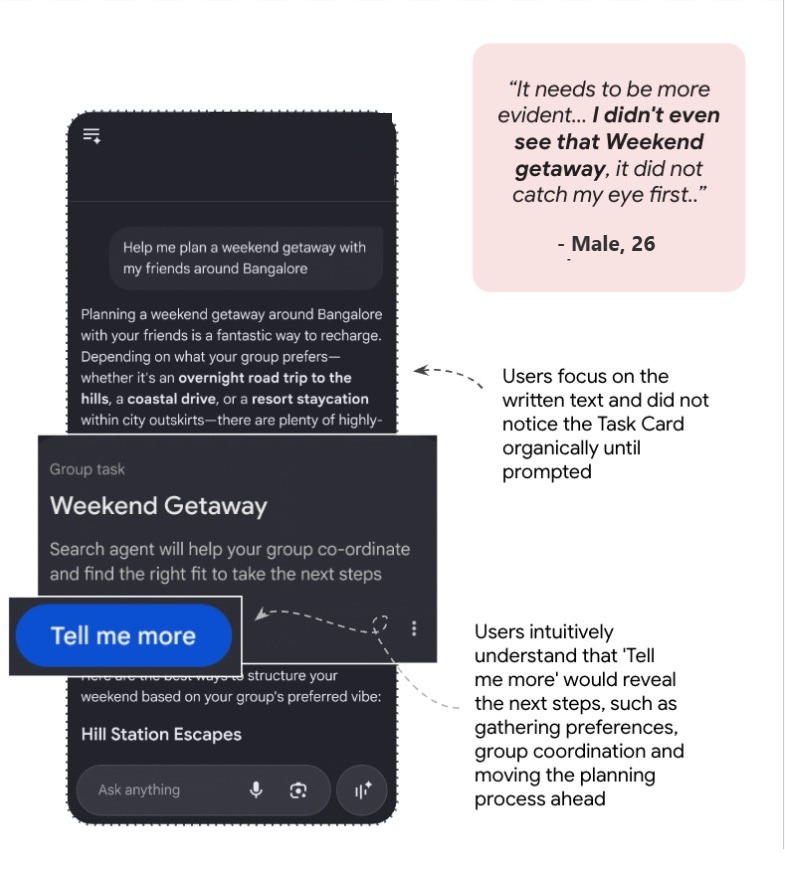
People understood it as an AI agent helping with group planning, but expected it to move from explaining to acting early on: asking the right questions, gathering preferences, prompting for the next input.

Task card

People didn't notice the task card until prompted. They read the text answer first, and expected the agent to start asking questions early.

They wanted it to collect dates, budget, trip preferences and transport before planning, not show screens full of explanation.

What this meansMake the first interaction actionable by starting to gather information straight away.

Prototype screen: a weekend getaway task card under a long text answer, annotated to show users read the text first and missed the card
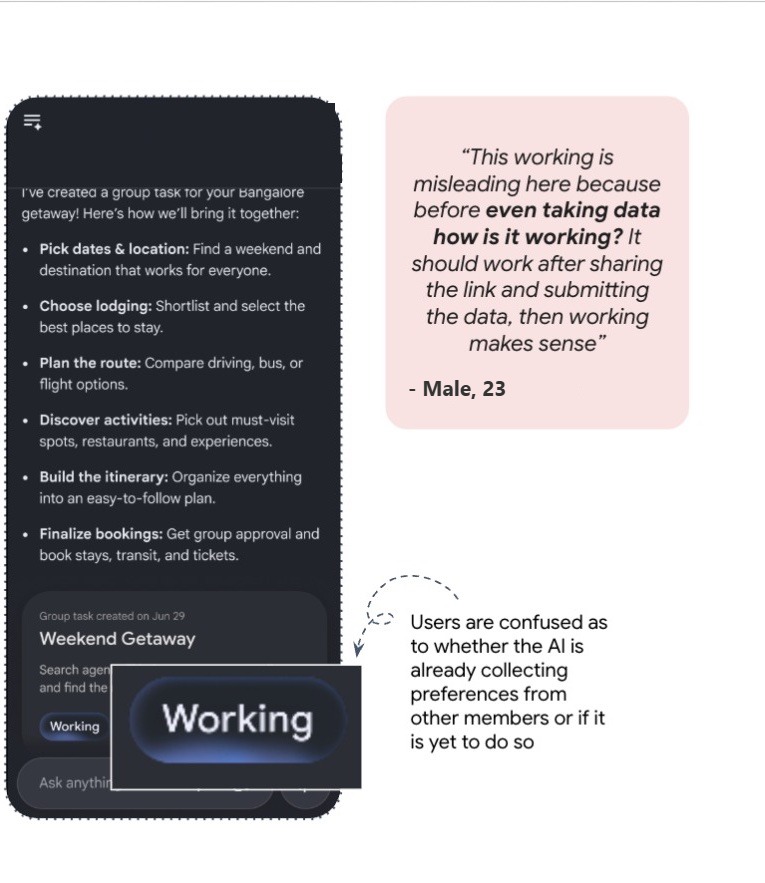
"Working" status

"Working" confused people: was the agent collecting, waiting for, or analysing the group's inputs?

They couldn't tell whether it was gathering data, making a link, contacting friends or just doing something in the background.

What this meansSay clearly what the agent is doing at each point, so progress and next steps are obvious.

Prototype screen: the group task showing a Working status, annotated with user confusion
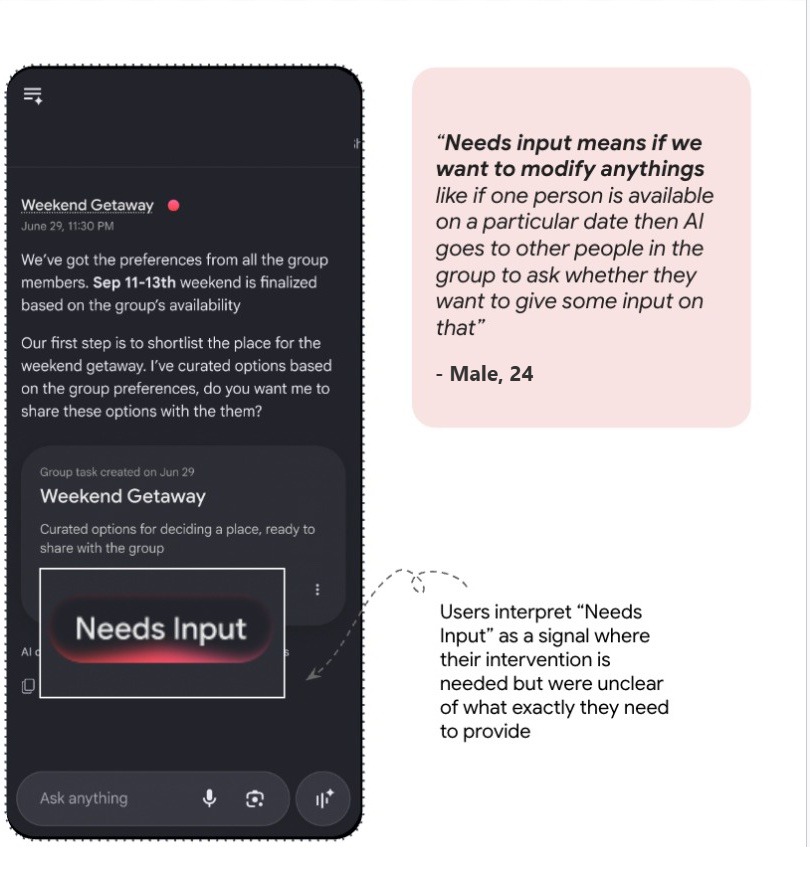
"Needs Input" status

People read "Needs Input" as a call for human direction, but weren't sure what to do next.

Give their own preference? Review the AI's suggestions? Wait for the others? Many expected the agent to spot clashes in people's availability and sort them out itself.

What this meansTell people exactly what's needed from them, so they're ready for the next step.

Prototype screen: the task card with a Needs Input status, annotated with how users read it
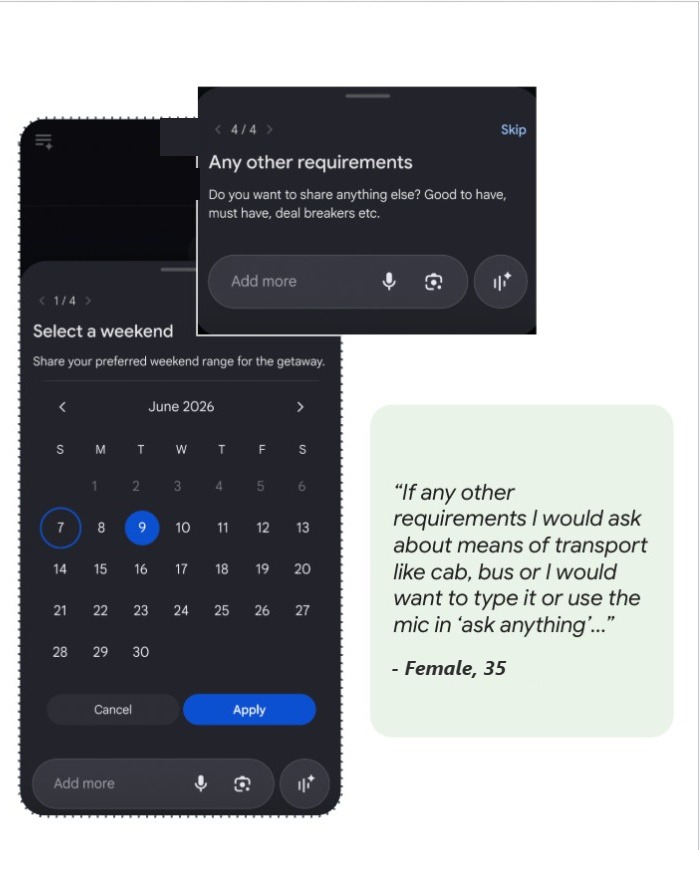
Preference cards

People liked the structured cards for choosing preferences, but wanted room to edit and add specifics like food.

Picking from cards cut the effort and the mistakes of typing everything out. They preferred typing extra wishes in the last card.

What this meansGather preferences visually and proactively, so people can set their intent without remembering or typing every detail.

Prototype screens: a calendar card to select a weekend and a card for any other requirements
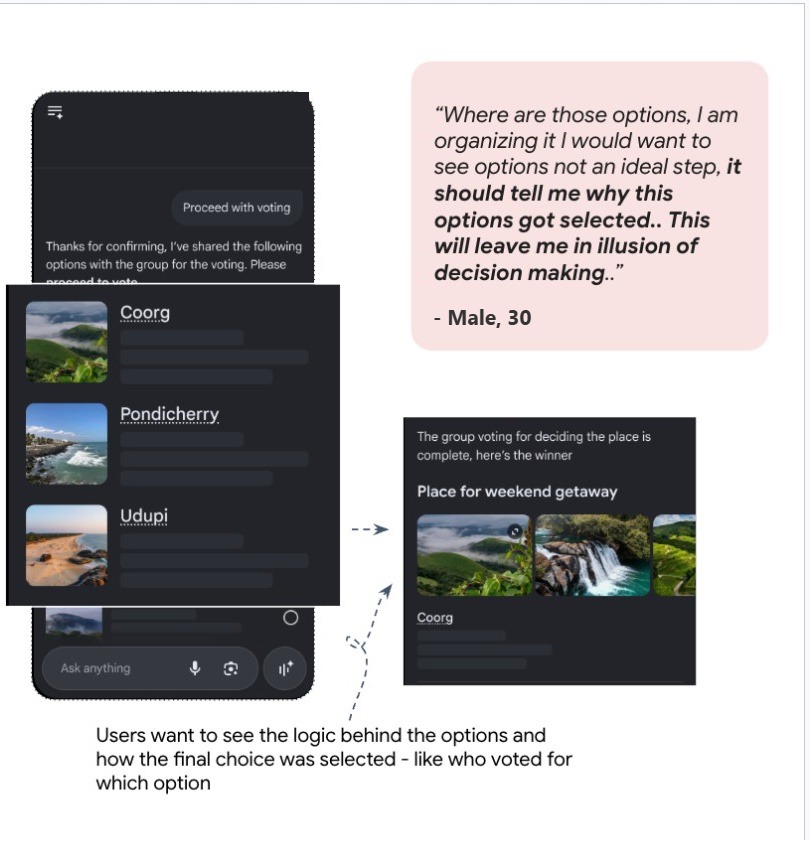
Voting

People wanted to know how and why the shortlist and the winner were chosen, not just see the result.

They wanted the reasons behind each option, everyone's preferences, who voted for what, and a clear confirmation step before anything was booked.

What this meansBe open about the reasoning at every step of research and coordination.

Prototype screens: three shortlisted places for a group vote, then the winning place
  1. How might we make the coordinator actionable from the first interaction to the end, without adding formal steps, screens or conversations?
    Open with the right questions (dates, budget, destination, transport, group size), cut screens with nothing to do, and use WhatsApp for updates and reminders.
  2. How might we make the agent's progress and next steps transparent?
    Replace vague labels like "Working" and "Needs Input" with what the agent is doing and what it needs, and show which stage it's at.
  3. How might we help groups move from individual wishes to a shared decision?
    Show places, dates, budgets, travel and stays side by side, so the group can vote and settle clashes.
  4. How might we give AI enough autonomy to coordinate while people keep control of important, irreversible decisions?
    Let the agent prepare the plan, but ask the group to confirm before booking; add edit and override controls, shared preferences and access settings.
What people expect from a group coordinator, and the personality they want
  1. Conversational preference gathering: ask relevant questions before acting, instead of long explanations up front.
  2. Voting and polling: a clear, WhatsApp-poll-like way to compare itineraries (Coorg vs Pondicherry), see budgets and vote on places, dates and transport.
  3. Rich decision support: pictures, credible reviews, deeper research and real alternatives, not one recommendation.
  4. WhatsApp integration: updates and reminders where people already are, not in a separate app.
  5. Group and access controls: who can join and interact, sharing or hiding preferences, adding questions, deciding which answers count.

The personality: a fair decision helper, neutral and able to mediate with empathy. Friendly and human, like an "AI cousin", but clear and concise, with no fluff, ads or chat spam.

  • Teammate and helper: coordinates without taking overMost
  • Neutral mediator: fair pros and cons in disagreementsMany
  • Empathetic and calm: understands budgets, babies, elderly needsMany
  • Non-intrusive: works quietly, respects privacySome
  • Witty and reasonable: smart, practical, groundedFew
Concept 2 · Shown to solo-task users

A multi-cart grocery journey

Ask the AI assistant to build a grocery cart, and it fills carts across several quick-commerce apps, compares them side by side and offers one checkout.

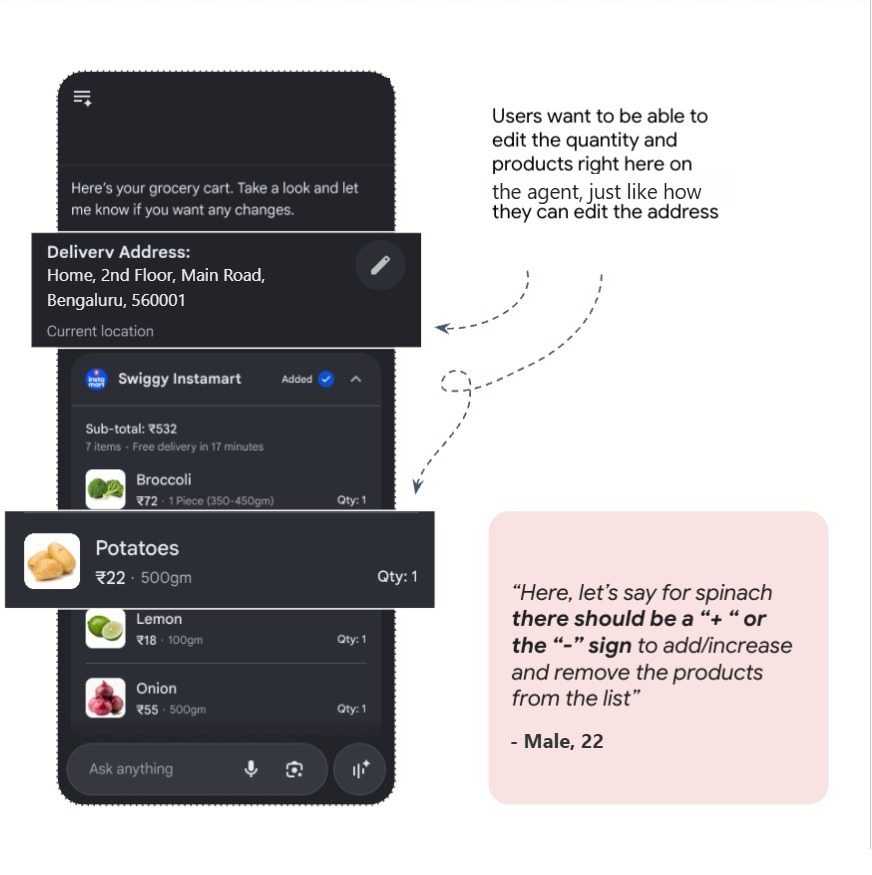
People valued several carts in one view over a single cart for comparing prices across apps, but expected to edit the carts right there, with clear information about missing items in each.

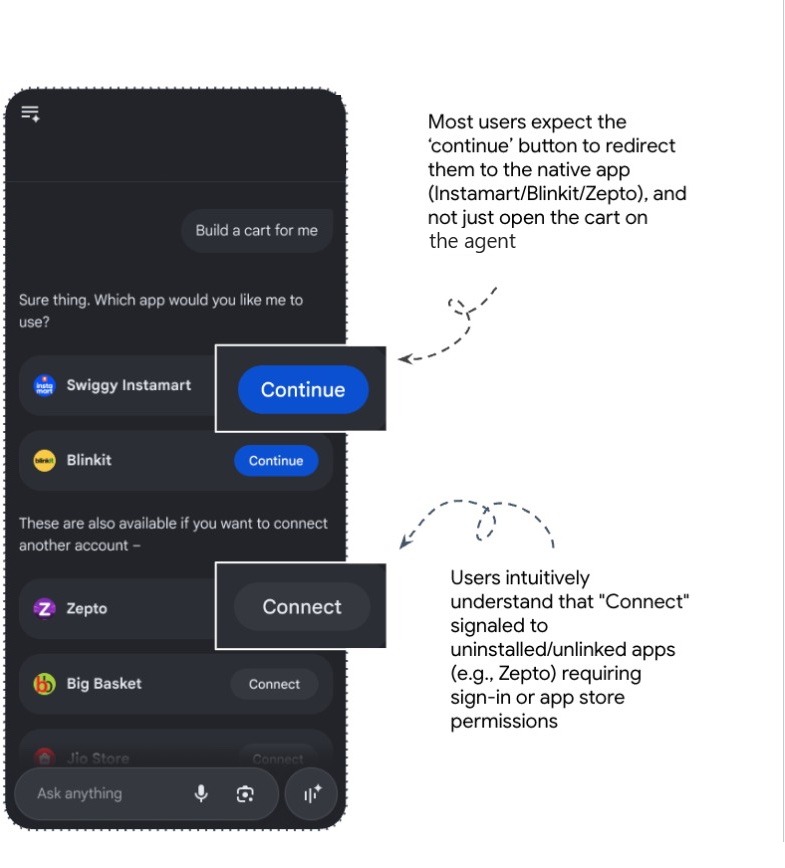
Choosing apps

People held conflicting ideas about where the journey would happen: inside the assistant, or in the shopping app.

Most thought "Continue" would open the app; some feared it would charge them. "Connect" was understood straight away. Staying in one view pleasantly surprised most people.

What this meansMake clear what every button will do.

Prototype screen: choosing which grocery apps to build carts on, with Continue and Connect buttons
Editing the cart

People liked having the cart in the same place, but wanted to edit it the way shopping apps allow, not by typing.

Most wanted "+" and "−" buttons and swipe-to-delete, instead of describing every change in the chat box.

What this meansKeep the cart editable on the same screen.

Prototype screen: a grocery cart with delivery address and items, annotated with the wish to edit quantities
Checkout

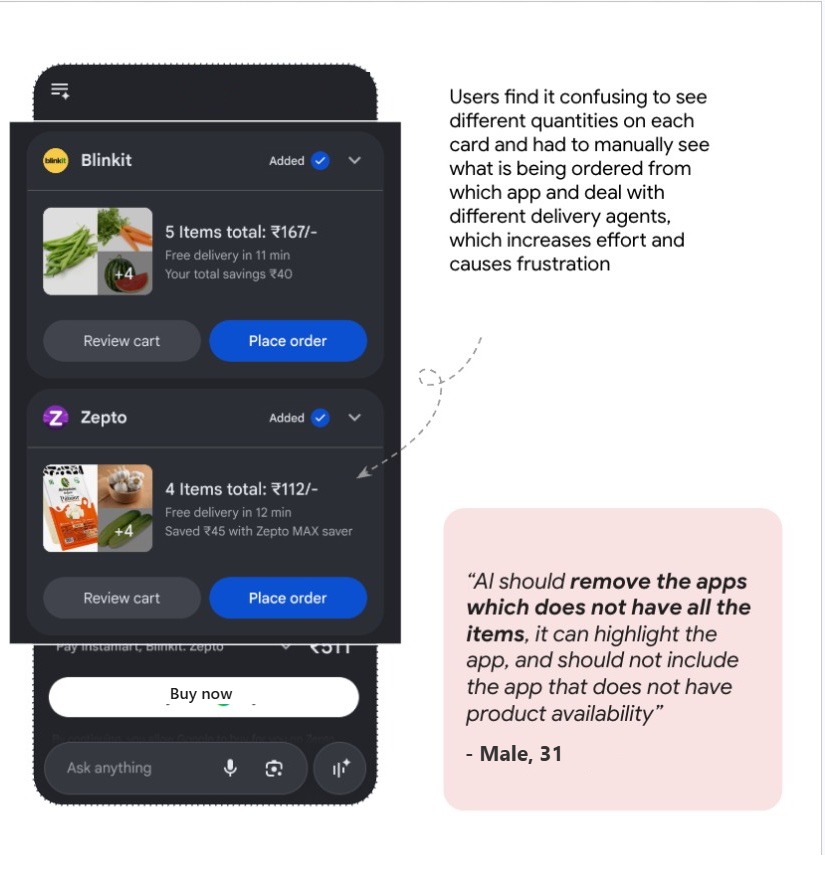
Different cart totals confused people, because they couldn't tell which items were missing where.

Some didn't realise their list had been split across three carts, and checked each one by hand. A few wanted one best shop with everything, or clear flags for what's missing.

What this meansShow exactly what's in, and missing from, each app's cart.

Prototype screen: two app carts with different totals and a single payment button
What people expect from a multi-cart grocery journey
  1. Single-tap payment in one place, automatically split between shops, rather than paying in three apps.
  2. All deliveries tracked together, ideally arriving in the same window.
  3. Cart controls: "+" and "−", dietary toggles, missing-item alerts.
  4. Discounts found and applied automatically across apps, so no deal is missed.
Concept 3 · Shown to solo-task users

Restaurant table booking with deals built in

The AI assistant finds a restaurant, gathers the offers from several booking platforms, lets you pick one and reserves the table.

People wanted every offer in one place with its details, clear prices upfront (cost for two, cover charge, total), and the menu without leaving.

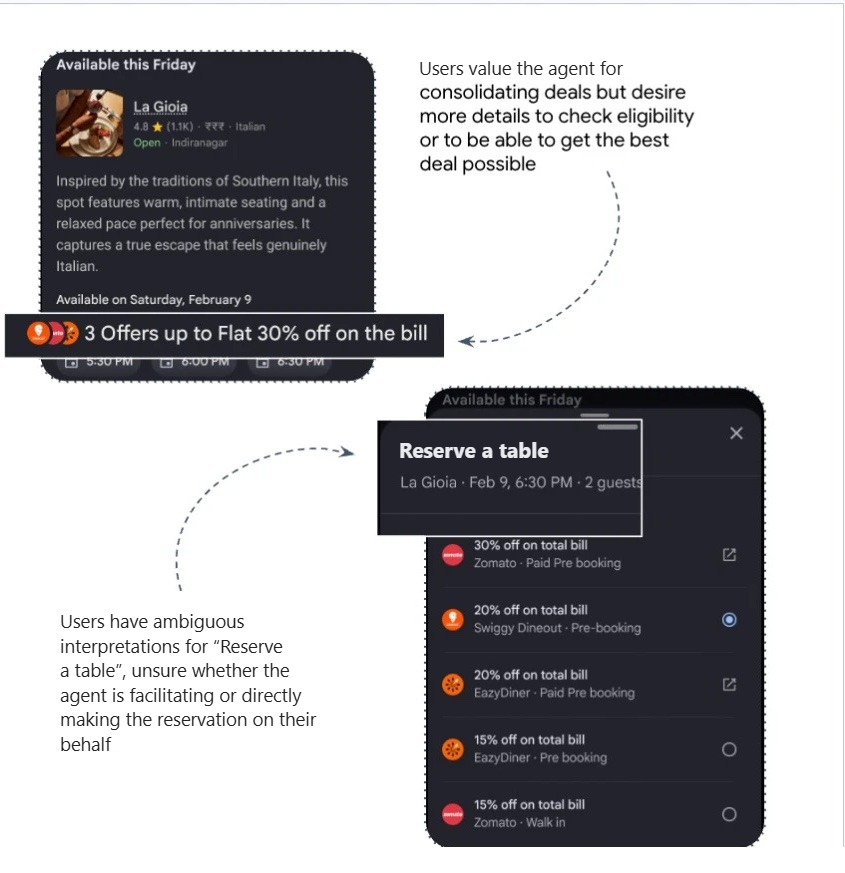
Deal stacking

People liked deals gathered in one place, but wanted to see the details and choose themselves.

"We found the best deal" wasn't enough: they wanted to know where each offer came from and its conditions, like "only with a certain credit card". The booking label was read two ways: helping, or booking on their behalf?

What this meansShow offer details openly so people can pick one they actually qualify for.

Prototype screens: a restaurant card showing three stacked offers, and a list of offers from different platforms
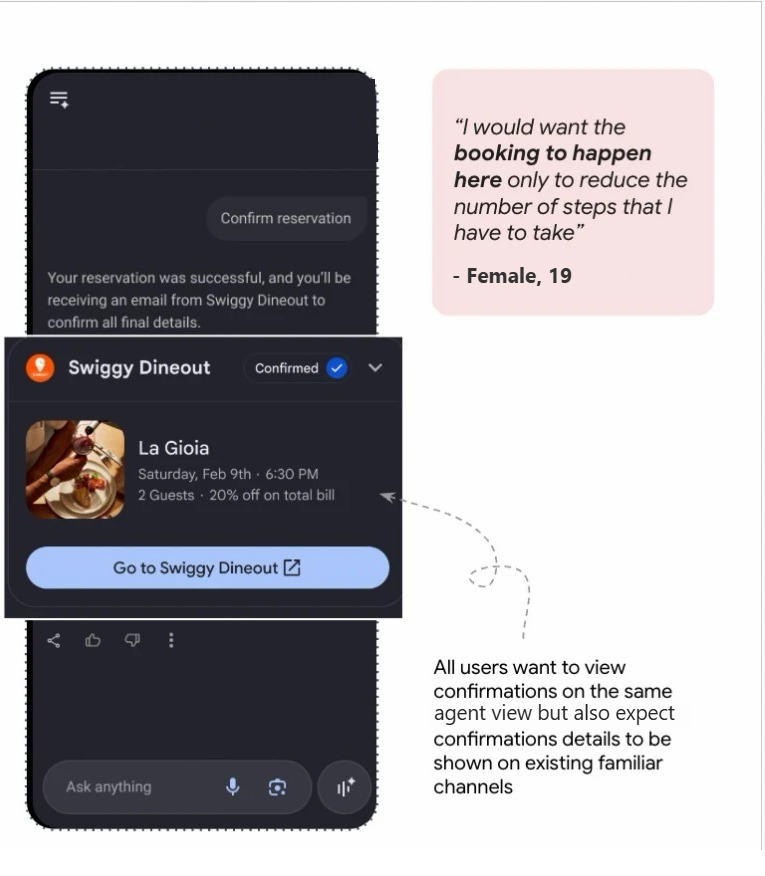
Booking

People wanted the whole booking handled in one place, with costs shown first and confirmation on familiar apps like WhatsApp.

Every agentic-curious user expected to book without leaving. Most were happy for AI to reserve, as long as charges like cover fees came first.

What this meansThe AI should be the start and end of the booking journey.

Prototype screen: a confirmed table reservation card

Across both solo concepts

  1. How might we make it easy to change or refine what AI has prepared, without asking the AI?
    Familiar controls like shopping apps have: "+" and "−", remove, edit preferences, change selections, right inside the AI experience.
  2. How might we make the agent's progress and next steps transparent?
    Say what each button will do: open an app, create a cart, apply an offer, or book or order.
  3. How might we help people understand options well enough to choose with confidence?
    Show the total and per-person cost, offer conditions, reviews, menu prices, availability, missing items and alternatives upfront.
  4. How might we let AI do the work while people keep the final decision?
    AI prepares the order or booking; people pick the offer, review the amount, and approve the booking or payment themselves.
Voice agents

What the client cared about most: an agent that talks to local businesses

We asked where people would want an agent to reach out for them, for example to a local salon. They saw it as a go-between for them and local businesses, handling the back-and-forth they'd rather not.

  • Do the legworkChecking timings, availability and prices, without making the same call to vendor after vendor.
  • Find the contactWhen they don't have a number, the agent can find it and reach the business directly.
  • Be polite, like a person wouldStart with a text (SMS or DM), and call only if the business doesn't reply in reasonable time.
  • Bring the decision back to meAI can't judge whether a business is trustworthy or protect their accounts, so people want the final information and transaction, checked step by step.
  • Sound human, not roboticPeople are tired of robotic customer-service voices that don't take feedback well. Many felt businesses would engage with a human-sounding voice, and might hang up on a bot.
  • Speak like a localSome felt a local accent would get a better price, and a foreign one a higher quote.
Impact

What the research gave the client

The project wrapped up recently, so what the client builds from it isn't public yet. What it gave them was a clear, evidence-based picture to make product decisions with.

  1. Sharper conceptsScreen-by-screen feedback on three early concepts, including the buttons and statuses they'd planned.
  2. Where AI can take the main seatThe tasks people are ready to hand over, and how agents fit into their day.
  3. The limitsWhere people draw hard lines, how much data they'll share, and their firm "no"s. Control over money is a no-go for both groups.
  4. How a voice agent should behaveText first, call as a fallback, and sound human, the area the client was most interested in.

From the clientThe client lead said the work gave them the depth they were looking for.

Looking back

What I took away

What was hard

A month, with mostly two of us carrying the work. Diaries are taxing: lots of back-and-forth, uneven quality, and chasing people for good answers around their own schedules. This was my fifth or sixth diary study at Peepal, and every one is new: different people, different data, different quality of recordings.

What worked

Tracking, maintaining and cleaning the data every day. Making sure each participant's entries were complete and clear before sending the next day's form kept the whole study intact.

What was new

Concept evaluation. Usually we design probes around a client's objectives. Here the client had specific concepts and wanted feedback on them, so I learned to draw insights from how people reacted to a concept, weigh them against what they said in the interview, and shape that into a deck.